Spaces
See only the part of your life you’re in right now.
Work bleeds into dinner. Home tugs at you mid-meeting. Spaces lets you switch MotivosAI to a single slice of life — Work, Personal, or one you make — so Today shows only what belongs there. Switch back whenever you want.
Live in MotivosAI today. Opt-in, fully yours, and it works by hand — no AI required.
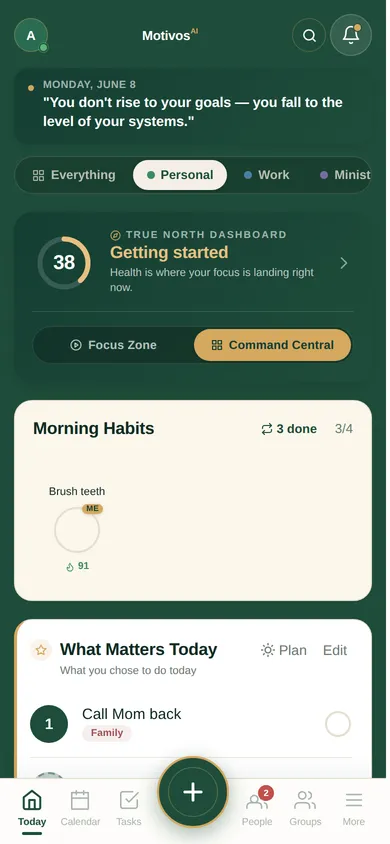
A real screen — Today, switched to Personal.
The problem
When everything is always visible, nothing gets your full attention.
One endless list doesn’t know you’re at dinner. The work task you can’t touch until Monday still stares at you Saturday morning. The personal errand nags in the middle of a deep-work block. You end up half-present everywhere — not because you don’t care, but because the noise never steps back.
Spaces lets the rest of your life wait its turn, so you can be all there for the part in front of you.
How it works
Switch your view in a tap.
- 1
Tap a space at the top of Today.
Everything, Personal, Work — and any you add. Today narrows to just that slice: its habits, tasks, and goals, and nothing else.
- 2
It already knows what goes where.
Spaces sorts by life area — Work shows your work and calling, Personal shows the rest. Anything you haven’t sorted shows everywhere, so nothing hides by accident.
- 3
Pin anything by hand.
On any task, habit, or goal, choose the space it belongs to. Add something while you’re in a space and it lands right there.
- 4
It layers on how you already work.
A space sets what you see; your mode — Focus Zone or Command Central — sets how much. They stack, they don’t fight.
Make it yours
More than just work and home.
-
Spaces you create
Name them, color them, retire them. A “Side project” space. A “Marathon training” space. Whatever your life actually has in it.
-
A space for your people
Give a family or group its own space, created right from the group. Everyone’s shared world in one slice, separate from your private one.
-
It can follow your calendar
Tie a calendar block to a space, and Today switches itself when that block starts, then comes back after. Turn it on only if you want it.
-
Off until you want it
Spaces stays off until you turn it on, and it’s entirely yours. Deterministic and private — no AI, no network — just structure you control.
Coming
Next: a space your whole team shares.
Today a family or group can already have its own space. Next, that space grows up: what your team decides in a meeting lands on the right person’s plate, and how the group is moving becomes something everyone can see — encouragement, never a scoreboard.
This shared team layer isn’t live yet — we’re shaping it with a few founding teams. Today, people and follow-ups stay shared across every space, and a group space doesn’t surface its shared tasks on its own yet. Those are the next layers.
Help build it: for teams · for masterminds
Spaces is part of MotivosAI.
One Life Operating System, sliced the way your life actually is. We’re opening MotivosAI to more people soon.